Detect devices
ICMP, local neighbour tables, DNS, SSDP/UPnP and mDNS/DNS-SD together provide a reliable overview of the devices on your network.

CN1 Discover detects devices in the local network, maps routers, repeaters, access points and clients, and evaluates connection paths over several measurement cycles. This makes abnormal paths visible before troubleshooting turns into guesswork.
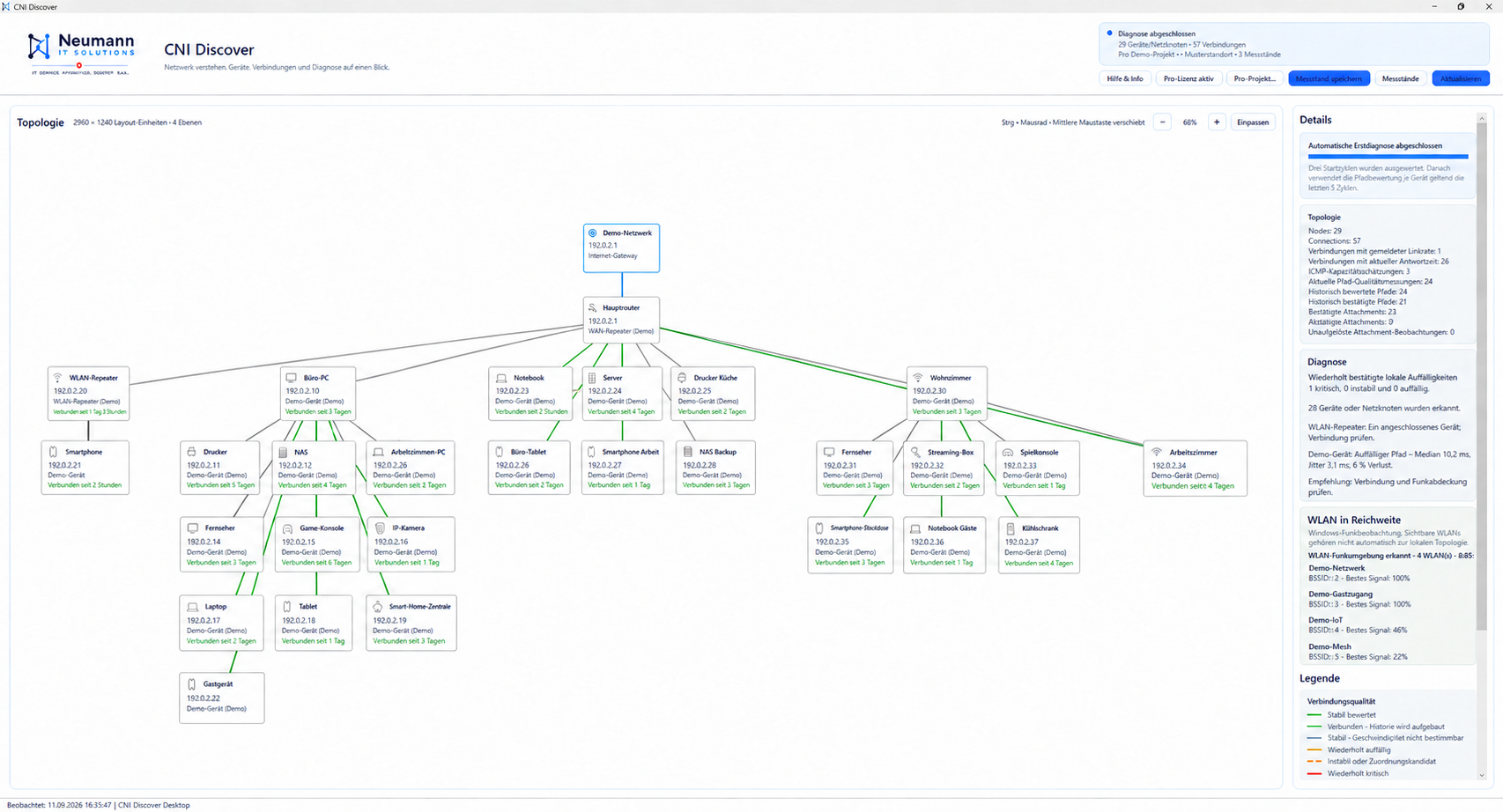
The presentation combines technical evidence with a clear visual hierarchy. Measured values, reported link rates and estimates remain clearly distinguishable.
ICMP, local neighbour tables, DNS, SSDP/UPnP and mDNS/DNS-SD together provide a reliable overview of the devices on your network.
Infrastructure and end devices are displayed hierarchically. Observed assignments remain marked as such.
Median, jitter and packet loss are evaluated over multiple cycles. Individual outliers do not immediately trigger an alarm.
After starting, CN1 Discover automatically carries out the necessary initial observation and transparently shows which phase is currently running.
Devices, local infrastructure, accessible services and initial mappings are collected.
Response times and connections are checked again so that short-term outliers can be identified.
Repeatedly abnormal paths are highlighted clearly in the topology and diagnostics view.
CN1 Discover combines repeatedly collected measurements with a clear visual assessment. This makes it possible to understand which properties were measured, reported or estimated and why a path is classified as stable, abnormal or critical.
Reachability, response times, median, jitter and packet loss form the technical basis. The colour coding makes the resulting assessment immediately visible.
ICMP packet sizes can provide indications of a bottleneck, but are not a substitute for a true data throughput test. Reported link rates and active ICMP estimates are therefore clearly labeled.
All prices are annual prices in Swiss francs and include 8.1% Swiss VAT.
For a quick overview of your own network.
permanently free
For technicians, admins and smart home installers.
including 8.1% VAT · 1 license
For small teams with several technicians.
including 8.1% VAT · 3 licences
Important: Pro and Team are not separate downloads. Both use the free Store app; your purchase unlocks the selected edition with an activation code.
A single ping can be distorted by a short-term outlier. The automatic initial diagnosis uses three cycles to distinguish repeatedly abnormal paths from individual fluctuations. Later updates refine the history.
A reported link rate is displayed as such. ICMP packet sizes only provide an active path estimate and are not reported as true payload throughput. For a reliable iPerf3 measurement, a remote station on the target device would be necessary.
No. The general diagnostics are designed so that customers do not need to enter router or device passwords.
Topologies, IP/MAC addresses, hostnames and measurement histories remain local to the Windows user profile by default. Files are only created through conscious export.
After purchase you will receive activation information. Subscription and billing information is managed in the protected Stripe customer portal.
No. CN1 Discover is a local diagnostic tool for on-site inventory, topology and repeated measurements. Central continuous monitoring is not part of these editions.