Saved means not yet protected
- A backup run failed unnoticed.
- The USB drive remained permanently connected.
- Insufficient storage or an unreachable destination went unnoticed.
- The recovery was never verified.

CN1 Backup backs up important files on Windows PCs and Windows servers automatically and encrypted on your own storage. The automatic recovery verification then checks whether data can actually be recovered - without having to rely on the cloud.
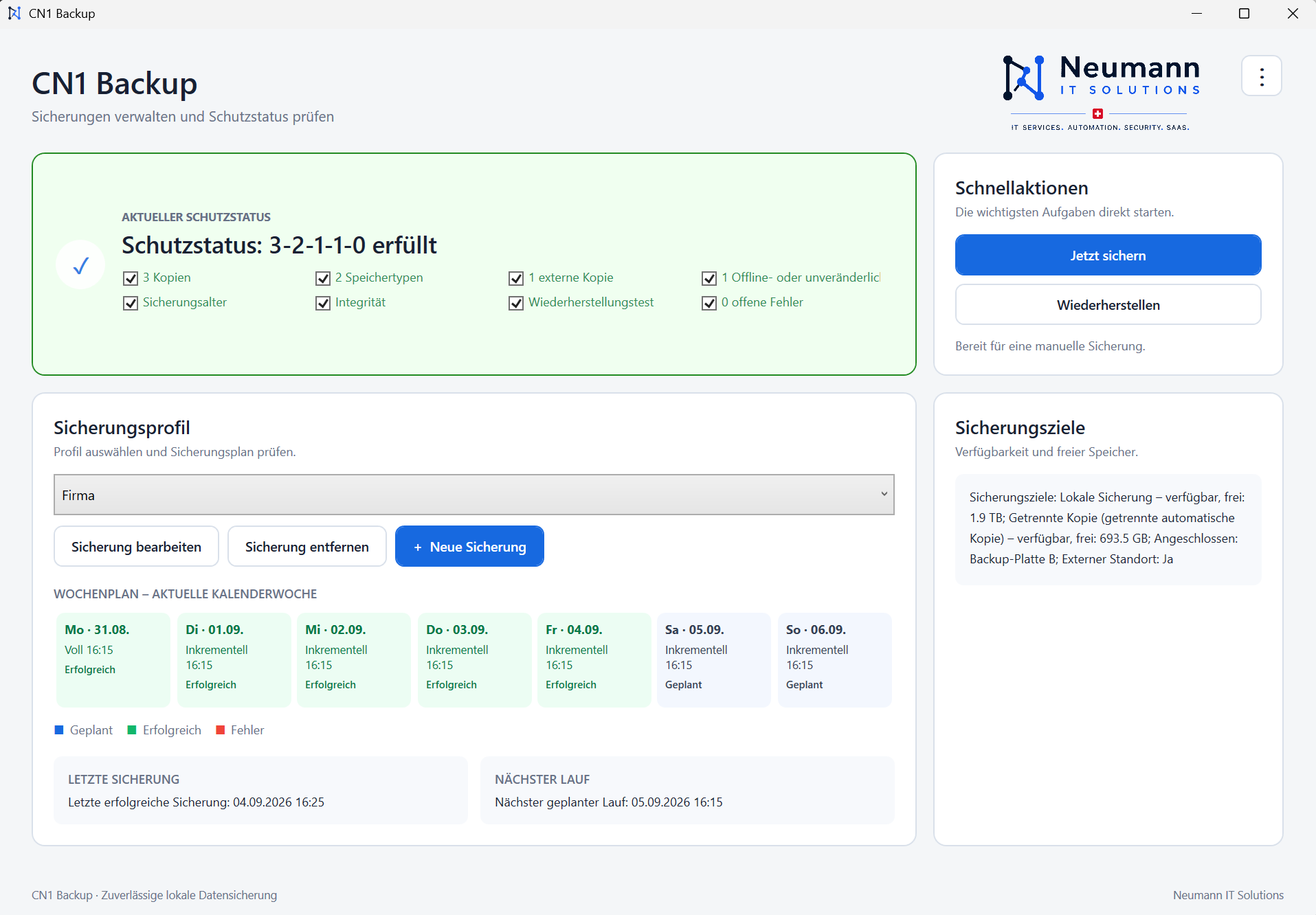
CN1 Backup not only evaluates the last backup run, but also the crucial evidence for reliable file protection.
Up to three backup profiles per installation clearly separate different data areas, targets and schedules from each other.
For each profile, you determine the day of the week and time of the weekly full backup. Incremental backups follow on the remaining days. Up to three start times per day are possible; Missed runs will be made up automatically.
Home retains 7 daily, 4 weekly and 6 monthly restore points; Business and Server retain 14, 8 and 12. Cleanup only runs after a successful full backup and technical pre-check.
Backups are encrypted on local drives, NAS/Windows shares or at least two rotating USB drives. The correct drive is recognised and safely ejected after the weekly cycle is complete. Keeping one copy separate and offline reduces the risk of ransomware encrypting every backup.
After each successful full backup, CN1 Backup automatically checks the integrity of the new backup set. In addition, a suitable file is restored to a temporary test area for testing, verified and then removed. If the test fails, it will be retried after a subsequent successful backup run. This not only checks whether the backup exists and is technically readable, but also proves for each full backup cycle that data can actually be restored from it.
Select backup status, file or folder and restore to a newly created target folder. Existing data is never overwritten. If your PC fails, your data can be restored to a replacement device using the encrypted emergency package.
The Business hub brings together five included Windows workstations and can be expanded with additional agents. Each workstation receives its own protected backup area and a traceable status.
A backup only helps if problems are identified in good time. The local display provides information directly on the device in all editions. If desired, supervised external monitoring can also be activated for Business and Server. Only after your express consent does Neumann IT Solutions monitor the technical conditions and inform the agreed fault contact if action is required.
Included in all editions
Upon request by Neumann IT Solutions · for business and servers after consent
You don't have to check the technical security statuses yourself every day. The cockpit takes over ongoing automatic monitoring. Neumann IT Solutions personally checks any anomalies during specified business hours and informs you if action is required before an unnoticed security problem becomes a risk in an emergency.
Not an open problem. No active notification is sent.
The customer automatically receives understandable information about the detected condition.
The customer receives a reminder with a recommendation for action. Neumann IT Solutions adds the process to the worklist and checks it personally during business hours.
The process will be checked personally as a priority. If there is a need for action, Neumann IT Solutions will contact the agreed fault contact during business hours.
Clear data protection boundaries: Only pseudonymized technical statuses are transmitted. Backup contents, file names, folder paths, and repository passwords do not leave the device. Monitoring does not enable remote control of your backups.
All prices are final prices including 8.1% Swiss VAT.
No cloud requirement. No evaluation of your backup content. No storage of your backup content at Neumann IT Solutions.
CHF 8.90/month · CHF 89/year
3 Windows PCs
Ideal for families, private photos, documents, tax records and other important files. Includes local file and folder backup, local monitoring, network targets, USB rotation, recovery and an emergency package. Retention: 7 daily, 4 weekly and 6 monthly restore points.
CHF 59/month · CHF 590/year
5 Windows workstations included + 1 Business hub
Centralised business backup with shared external and offline protection. Upon request and with your consent, Neumann IT Solutions activates supervised external monitoring, keeps an eye on the technical backup status of the workstations and informs you when action is required before an unnoticed backup problem becomes a risk. Retention: 14 daily, 8 weekly and 12 monthly restore points. Additional agent CHF 7/month or CHF 70/year.
CHF 39/month · CHF 390/year
1 Windows server
File and folder backup with VSS for Windows Server 2019, 2022 or 2025, local monitoring, network targets, USB rotation, recovery and an emergency package. Supervised external monitoring by Neumann IT Solutions can be activated upon request and with your consent. Retention: 14 daily, 8 weekly and 12 monthly restore points.
CHF 98/month · CHF 980/year
Business and server scope
A shared licence code with local monitoring. Supervised external monitoring by Neumann IT Solutions can be activated upon request and with your consent. Included are one Business hub, 5 Windows workstations and 1 Windows server; workstation and server licences are counted separately.
Before you buy, you know what CN1 Backup does and which tasks are consciously left to other solutions.
CN1 Backup does not provide cloud storage. The backup targets are provided by the customer and remain under their control.
Files and folders are backed up. System images, bare metal restore, Linux, macOS, and direct Docker, database, and Microsoft 365 backups are not included.
CN1 Backup does not prevent an attack. However, keeping a USB copy separate and offline reduces the risk of ransomware also encrypting all backups. The restore is done from a suitable, unaffected save state.
The encrypted emergency package can be used to transfer the recovery information and repository key to a replacement computer. The backed up files can be restored there.
Yes. The backup data is stored encrypted. The associated repository password or the securely stored information from the emergency package is required for access.
Yes. The emergency package is intended precisely for recovery on a replacement device. It must therefore be kept separate from the backed up computer and the backup media.
Yes. An appropriate NAS or Windows network share can be used as the backup destination. Access is stored during setup and used by the security service.
Local backups to accessible local drives, USB disks or network destinations continue to run in the event of a temporary Internet failure. The optional external monitoring can only transmit new states again as soon as the connection is available.
In a short conversation we will clarify together: